.svg)



It's that time of year again, when I get to lecture you on the fundamentals of password security. But I’m not just going to tell you to use a password manager, make your passwords long, and add multiple factors. I would hope you know that by now! So this year is going to be a little different. I'm going to tell you why password security is so important and why it's not just something you should do once a year. And good password hygiene isn’t a milestone you should check off once a year; it’s maintenance. The threats keep advancing, your accounts keep growing, and data leaks are not going away, so the credentials you created years ago come back to bite you.
Why any of this matters: the reuse economy
The single most useful thing to understand about password security in 2026 is that attackers have largely stopped guessing. They don't need to. Why brute-force one account when you can use a username and password that already worked elsewhere and try them everywhere?
That's what we call a “credential stuffing attack,” and it relies on one human behavior: password reuse. It doesn't matter how strong your password is. A 40-character monster generated by a password manager offers no protection if it is used on two sites and one of them gets breached. Strength stops guessing attacks; it does nothing against a credential that's already been handed over.
The 2026 Verizon Data Breach Investigations Report found credential abuse somewhere in the attack chain of 39% of breaches. Software vulnerabilities have overtaken stolen passwords as the most common initial entry point, but once attackers are inside, a valid login is still a fast next step.
The report also connects infostealers to ransomware. Infostealers are bits of malware designed to steal saved passwords and session cookies from an infected browser. Among ransomware victims who'd had a credential leak in the previous year, half were hit within 95 days of it.
In terms of numbers, the counts are staggering. Flashpoint's 2026 midyear threat report counted 1.7 billion credentials harvested by infostealers between January and June 2026, from 7.4 million infected devices. And in June 2026, Cybernews researchers found an exposed database holding 24 billion credential records, built from infostealer logs, Telegram channels, and old breach compilations. Each record also has the login URL it belonged to.
This isn't hypothetical, it's pretty common. Here are a few examples from this year:
- Chick-fil-A (June 2026): Over three days, attackers used credentials "obtained from a third-party source" to get into more than 13,000 Chick-fil-A One loyalty accounts, exposing names, addresses, mobile pay numbers, and the last four digits of payment cards.
- PcComponentes (January 2026): An attacker claimed to have stolen 16 million customer records from the Spanish tech retailer. PcComponentes said its databases were never touched but confirmed a credential-stuffing attack against customer accounts. Researchers traced the logins to infostealer logs, some dating back to 2020.
- Snowflake customers (2024, guilty plea August 2026): Attackers logged into the Snowflake tenants of around 165 organizations, exposing records of at least 100 million people. The passwords had been harvested by infostealers years earlier, never changed, and multi-factor authentication (MFA) was switched off. One of the attackers pleaded guilty in August 2026.
Password managers: Chaos or Control
You might have expected me to dive straight into the cardinal rules for creating rock-solid passwords. But the truth is, if a password is hard to crack, it’s hard to remember. And when you have hundreds of accounts you have to remember in your already saturated brain, you’re fighting a losing battle. Faced with that mental overload, most people default to what’s easy to recall and therefore easier to crack. That's where chaos takes over.
Enter the humble password manager.
Used properly, a password manager is an invaluable ally. It effortlessly generates and stores long, complex passwords, integrating directly with your browser and mobile device so you never have to memorize another string of random characters.
Used carelessly however, it can spell disaster. By design, a password manager puts all your proverbial eggs in one basket. If your vault password – that one password to rule them all – gets compromised, everything else will be too. It’s a risk, but one that can be significantly mitigated by having a few additional measures in place.
And what about the headlines warning that password managers themselves get hacked? While high-profile breaches do happen, modern vaults use zero-knowledge architecture, meaning attackers walk away with scrambled, encrypted code they can't read. As long as your vault password is long and unique (and backed up with two-factor authentication), that stolen data remains completely unreadable, keeping the odds firmly in your favor.
What makes a strong password now
There are still a few places where you need a password and can not rely on a password manager. For example, the password for your password manager vault itself or your corporate device logon.
The old advice was to cram in symbols and numbers: P@ssw0rd!. That obsession with "your password must contain…" produced passwords that were hard for humans to remember and easy for machines to crack, which is the worst of both worlds. Made even worse by the mandatory change-your-password-every-month requirement.
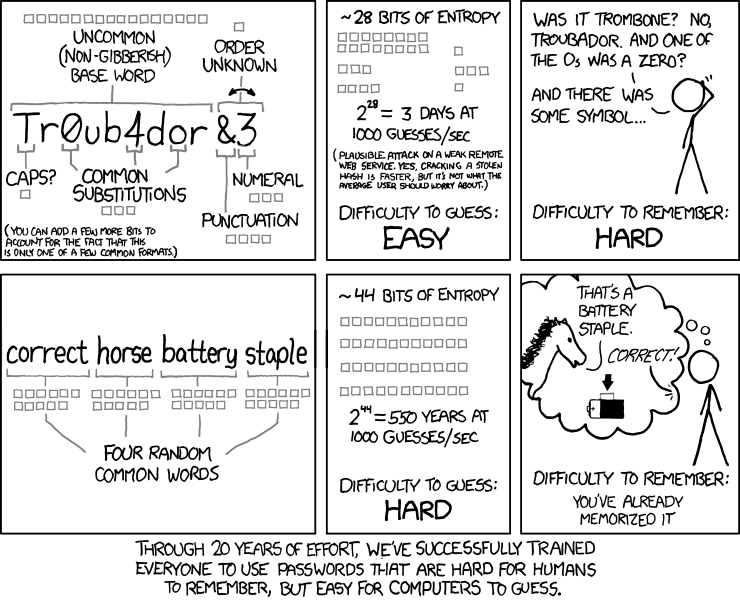
Current National Institute of Standards and Technology (NIST) guidance has moved decisively toward length over complexity: long passwords beat short-but-complex ones, and you should be allowed to use the full length and character range without silly composition rules forced on you.
My go-to is still a passphrase: a line from a book or a song, with its own punctuation and capitalization. It's long, it's easy for me to recall, and it's hard to crack unless someone is specifically targeting me and happens to know my bookshelf or playlist.
One bad habit worth dropping: routine, calendar-driven password rotation. NIST now explicitly advises against it because when people are forced to change a password on a schedule, they make small, predictable tweaks (email2025! becomes email2026!), which helps attackers more than it hurts them. That doesn't mean never changing a password; it means changing it when there's an actual reason to.
The big change: passkeys
The single most significant shift in password technology in recent years is that passkeys have gone from an “it's an available standard” to something you can genuinely use on most of the accounts that matter. Google, Apple, Microsoft, Amazon, GitHub, PayPal, and a long and growing list of others all support them now.
So what is a passkey? A passkey is a cryptographic key pair built on the FIDO2/WebAuthn standards. The private half is stored on your device; the service holds the public half. When you log in, your device proves it holds the private key (usually protected by your fingerprint, face, or device PIN) without ever sending a shared secret over the wire.
MFA: still essential where passkeys aren't
Until passkeys are everywhere, MFA is still your most important layer on password-based accounts. The logic hasn't changed: if your password is leaked or cracked, a second factor means the attacker still can't get in. It shifts the goalposts, and for the opportunistic, automated attacks that dominate, shifting the goalposts is often enough to stop them from getting in.
Not all MFAs are equal, though, so think of it as a ladder:
- SMS codes are the weakest form (vulnerable to SIM-swapping and interception), but some protection beats none. If it's the only option a service gives you, take it.
- Authenticator apps such as Google Authenticator generate time-based one-time password (TOTP) codes. They're a solid step up and widely supported.
- Hardware security keys (a YubiKey or similar) are the strongest widely available option. An attacker needs physical possession of the key, which raises the bar enormously.
Know your exposure: Have I Been Pwned
Given that the whole attack economy runs on leaked credentials, it's worth knowing when yours ends up in a dump. Have I Been Pwned is free, and still the one I recommend to everyone. Register your email address, or a whole domain if you can prove you own it, and you'll get a notification whenever it turns up in a public breach. That's your cue to change that password (and anywhere you reused it – though by now you've stopped doing that, of course!) before it gets replayed.
For the security-minded, the same service exposes a breached-password API, which matters for the developer section below. And if you manage a domain, the domain-level monitoring gives you a view across all your users' exposed accounts, which is a genuinely useful early-warning signal for an organization.
The bit everyone skips: maintenance
Setting up strong passwords is the easy part. Keeping them strong, across hundreds of accounts, as breaches pile up and services come and go is the hard part.
- Review, don't just set. Most managers have a security or vault health report that flags reused, weak, and known-breached passwords. Run it now, and once or twice a year after that.
- Change a password the moment there's a reason to. A breach notification, for example, from Have I Been Pwned.
- Delete old accounts. Don't just abandon them. This is the one people rarely do, and can be a gateway for attackers to reveal personal information, additional emails, or long-forgotten password patterns.
None of this is fun or exciting but password security should be a habit, not a yearly project.
I did it my way…
It wouldn't be fair to hand out all this advice without saying what I actually run. My current setup is LastPass paired with a YubiKey for the strong second factor, Google Authenticator is my primary TOTP for most apps and services and passkeys on every service that supports them.
What works for me might not work for you, so when you're choosing, weigh price, security, usability, integrations, and the devices you actually use. Don't trust me blindly. Do the research yourself.
And if you want to get hands-on with how this stuff actually breaks (how hashes are cracked, how credentials get stuffed, how authentication fails), Immersive has a collection of labs on exactly that. Log in if you've got a license, or book a demo if you'd like to see the platform.

See how to prove readiness with one platform.
See how Immersive One helps technical teams and leaders prove readiness, close capability gaps, benchmark progress, and report cyber resilience with confidence.